Managing survey quota is one of the ways to add logic and program your survey.
For example, if you would like to have an equal distribution of males and females in your survey, quota control allows you to put a limit on the number of people responding to each option and optionally terminating the responses based on the specified criteria.
Answer quota control can customize the flow of the survey based on the number of responses for each answer item. It lets you track how many respondents meet a condition. If the number of responses reaches the limit, you can configure the next sect of action. If you want a limited number of responses per answer option, you can end the survey or delete the other responses.
Setting a survey quota on the number of responses per option ensures you gather only the exact amount of data required. Enabling a minimum quota option applies to multi-select questions only.
If the respondent selects more than one option, but one of the options' quota is full, they can choose another option. In such a case, the survey will not terminate, and the user will be allowed to continue to the next question.
Example of quota control
Consider the below example of a multiple-choice question. A respondent can have one or more cards from the given choices. If the respondent selects only Visa after the quota is full, the survey will terminate. However, in case the respondent has both Visa and Mastercard, he/she can select both options. Even if the quota on the Visa option is full, the system will record both these answers, and the respondent can continue to the next question.
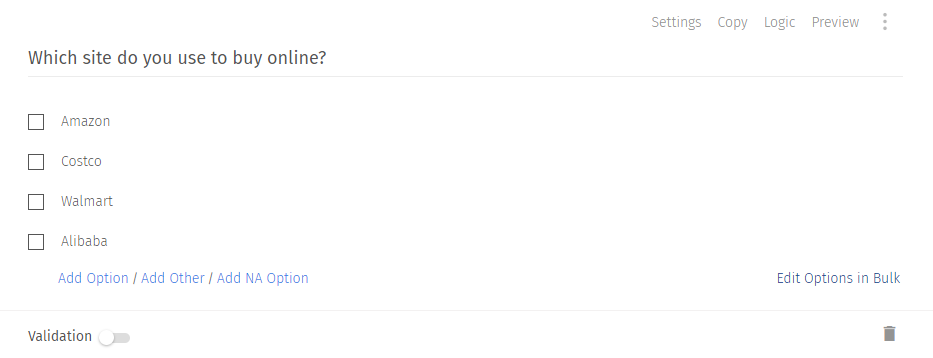
Consider a market research company that wants to compare customer loyalty of various brands. It will ask a question like, “Which site do you use to buy online?” The answer options can include Amazon, e-Bay, Walmart, and Alibaba.

This type of question is known as a screener question. After receiving the answer to the screener question, it decides if another respondent for the same e-commerce site is needed. Say, if the quota for Amazon is filled with enough responses now if any respondent who selects Amazon will be displayed a page saying that the target quota for this option is complete.
If the limit for the Amazon option isn't hit, then the respondent can answer the next question - “What do you like most about your shopping experience with Amazon?”
Uses of quota control in surveys
Quota control helps avoid any skewing of data. In a situation when the distribution of the sample audience is uneven, the number of responses from a specific segment will be more than others. It is highly likely that their answers will match and will ultimately skew final reports and can lead to deriving incorrect insights from the final reports. Any decision based on inaccurate ideas can prove fatal for the business. Quota control removes the chances of any such discrepancy in the data and ensures the accuracy of data.
Quota control in survey research enables collecting a proportionate number of responses for each option based on the proportion of a demographic segment.
Consider an e-commerce website that wants to conduct a website usability survey.
Typically, an e-commerce website has different versions of its shopping portal for mobile and desktop users. If their research team wants to design a survey, they will need to ask a qualifier question. This question will have two options - Mobile and Desktop. The qualifying query will decide if the respondent shops from a mobile phone or desktop. To arrive at the correct conclusion, the survey creator must put a quota control over one of the answer options. So, once we reach the limit of mobile phone users, the survey will proceed for respondents who select the desktop answer option.
Another scenario when a quota control logic can be useful is when it’s required to limit the number of respondents from a particular country.
Types of quota control options in surveys
A survey creator can use quota control logic in a survey at various levels.
Automatic quota control: Limit the number of responses for your survey. View our help file on automatic quota control.
Complex quota control:. Set up quota based on responses to multiple questions and/or custom variables. This type of setup is also known as weighted quota control. View our help file on complex quota control.
Custom variable quota control: Set up quota based on responses to multiple custom variables. View our help file on custom variable quota control.
Dynamic quota control: Control how many respondents do you want for each option in your survey.
Setting quota actions.
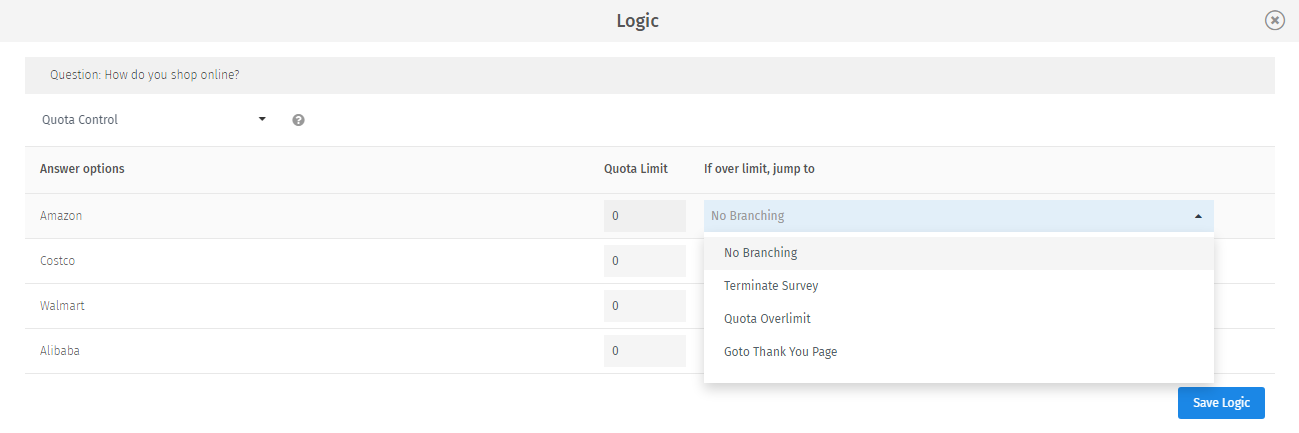
There is a limit on the number of times a specific answer option is selected. The survey can be programmed to one of the below actions once we reach the quota limit.
Another question: Take respondents to another question in the survey.
Terminate survey: Terminate the survey for respondents who select a particular answer option. Such responses are considered as terminated and are considered incomplete. You can filter to see responses for those who were terminated via branching in the report filters. Use this option to decide if a respondent qualifies to answer a survey further.
Quota overlimit: When the number of responses goes above the prescribed limit, the quota overlimit page is visible to the respondent. You can customize quota over limit messages to give a better experience to the respondents.
Go to thank you page: Direct respondents to the 'Thank You' page. The system marks these as a complete response.
Advantages of using quota control in surveys
Accurate data: Accuracy of survey reports depends on the precise data collection from the target audience. Applying a quota ensures the pool of responses are valid and qualified to answer further questions.
Proportionate data: The way an online sample is collected affects the accuracy of results. Instead of surveying the entire population, market researchers distribute an online survey to a subset of a population that best represents their target audience.
Add or edit quota anytime: You can apply a quota even after the survey is live. You can also edit the answer quota limit to increase or decrease the number of responses for a specific answer item.
Limit number of rewards: Quota control can be used to limit the number of rewards to be given. Say, in an online quiz having a multiple-choice question, all first five respondents who select option A should be rewarded.
How to set up quota control in your surveys
Learn how to set up and use this feature with our help file on Quota Control.

 Survey Software
Easy to use and accessible for everyone. Design, send and analyze online surveys.
Survey Software
Easy to use and accessible for everyone. Design, send and analyze online surveys.
 Research Suite
A suite of enterprise-grade research tools for market research professionals.
Research Suite
A suite of enterprise-grade research tools for market research professionals.
 CX
Experiences change the world. Deliver the best with our CX management software.
CX
Experiences change the world. Deliver the best with our CX management software.
 Workforce
Create the best employee experience and act on real-time data from end to end.
Workforce
Create the best employee experience and act on real-time data from end to end.